
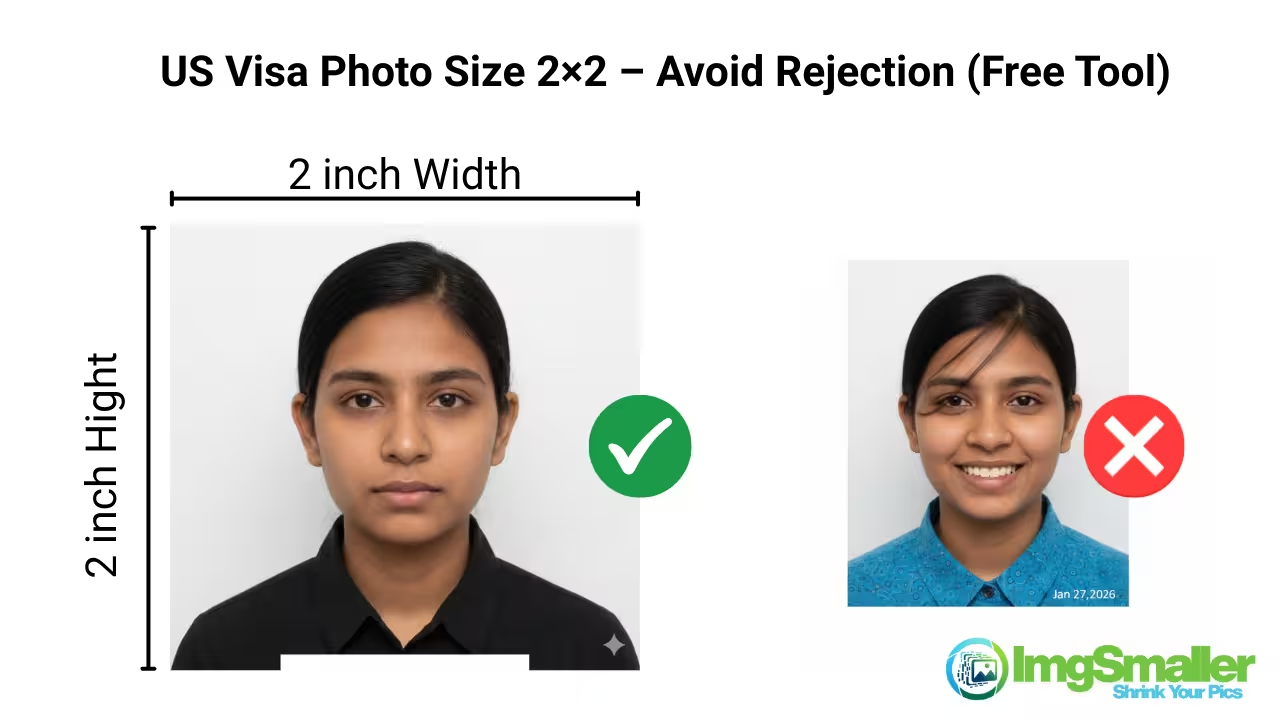
The 2×2 inch photo size is commonly required for US visas, green cards, and ID cards. If your form or country requires a different size, ImgSmaller helps you resize photos accurately in seconds.
-
For Indian passport and visa applications, use
👉 Resize image to 3.5 × 4.5 cm -
If the size requirement is reversed or landscape-based, try
👉 Resize image to 4.5 × 3.5 cm -
For profile photos, resumes, or online uploads, use
👉 Resize image to 1080 × 1080 pixels online
These tools help you meet exact photo specifications without manual editing.
US Visa Photo Size Online – Resize US Visa Photo Instantly
(Official Requirements)
Looking for the correct US visa photo size? Use our US Visa Photo Size Online tool to resize, crop, and adjust your photo exactly according to official U.S. Department of State visa requirements — without stretching or losing image quality.
Whether you are applying for a B1/B2 tourist visa, F1 student visa, H1B work visa, or US Green Card, this tool helps you create a 100% compliant US visa photo in just a few seconds.
🛠️ How to Resize US Visa Photo Online (Step-by-Step)
You don’t need Photoshop or paid apps. Follow these simple steps:
Step 1: Upload Your Photo
-
Click Choose File or drag & drop your image
-
JPG, JPEG, PNG formats supported
Step 2: Select US Visa Photo Size
-
Choose 2 × 2 inches (51 × 51 mm)
-
DPI auto-optimized for visa submission
Step 3: Adjust Head Size Using Guidelines
-
Enable head & face guideline
-
Drag image to align top of head to chin correctly
-
Crop instead of stretching to maintain natural proportions
Step 4: Fix Background (Optional)
-
Remove background
-
Replace with pure white if required
Step 5: Download Instantly
-
Download as JPG or PDF
-
Ready for DS-160 upload or printing
✔ No watermark
✔ No signup required
✔ Works on mobile & desktop
👤 Head Size & Position (Very Important)
-
Head height: 1 inch to 1⅜ inches (25–35 mm)
-
Top of head to bottom of chin: 50%–69% of the image height
-
Eyes: Positioned between 56%–69% from the bottom of the photo
👉 Our tool includes a face & head size guideline so you can adjust the image correctly and avoid rejection.
Background & Appearance Rules
-
Background must be plain white or off-white
-
No shadows on face or background
-
Neutral facial expression
-
Both eyes open, looking directly at the camera
-
No filters or heavy retouching
Supported US Visa Types
This tool works for all US visa categories, including:
-
B1 / B2 Tourist & Business Visa
-
F1 Student Visa
-
H1B / H4 Work Visa
-
J1 Exchange Visitor Visa
-
L1, O1, EB visas
-
US Green Card / DV Lottery
❌ Common Reasons US Visa Photos Get Rejected
Avoid these frequent mistakes:
-
❌ Wrong photo size (not 2×2 inches)
-
❌ Head too big or too small
-
❌ Face too close to camera
-
❌ Background not white
-
❌ Blurry or low-resolution image
-
❌ Shadows or uneven lighting
Our US visa photo size online tool is designed to fix all these issues in one place.
| Requirement | US Visa Standard |
|---|---|
| Photo Size | 2 × 2 inches |
| Pixels | 600×600 to 1200×1200 |
| Background | White / Off-white |
| Head Height | 25–35 mm |
| Format | JPG / JPEG |
| Glasses | ❌ Not allowed |
| Head Cover | ❌ Except religious |
🔒 Privacy & Security
-
Zero-upload mode supported
-
Images processed securely
-
No photo stored on our servers
-
Your data stays private
Advanced Features for Perfect US Visa Photos (Built-In)
Our US Visa Photo Size Online tool is more than just a resize utility. It includes advanced features designed specifically to meet U.S. visa and passport photo standards, helping you avoid common rejection reasons.
Remove Background or Change Background Color
-
Instantly remove the existing background
-
Replace it with:
-
✅ Pure white (recommended for US visa)
-
🎯 Any custom background color if required
-
-
Eliminates shadows, patterns, and uneven lighting
👉 This is ideal if your photo was taken at home or against a non-white wall.
Head Size Guideline (Default 30 mm for 2×2 inch Photos)
To meet official US visa rules, the tool includes a head size guideline overlay:
-
Default head size: 30 mm (top of head to chin)
-
Optimized for 2 × 2 inch (51 × 51 mm) US visa photos
-
Visual guide clearly shows:
-
Top of head position
-
Chin alignment
-
Proper face proportion
-
You can:
-
Drag the image to align your face perfectly
-
Adjust head position without stretching
-
Ensure correct face-to-photo ratio (50–69%)
This feature is especially useful for fixing errors like:
-
“Face too close to camera”
-
“Head size incorrect”
-
“Improper photo composition”
All-in-One US Visa Photo Tool
With a single tool, you can:
-
Resize photo to US visa size
-
Set correct head height (30 mm default)
-
Remove or change background color
-
Crop without distortion
-
Download DS-160 ready photo
No Photoshop. No studio visit. No guesswork.
Why This Matters for US Visa Approval
Most US visa photo rejections happen due to:
-
Incorrect head size
-
Background not white
-
Improper face positioning
By using:
-
Background removal to white
-
Head size guideline set to 30 mm
-
Official 2×2 inch dimensions
—you significantly reduce the risk of rejection.
Why Use This US Visa Photo Size Online Tool?
-
✔ Exact US visa dimensions
-
✔ Head size & face position guide
-
✔ Background removal option
-
✔ Instant preview & download
-
✔ Printable format supported
-
✔ Trusted by visa applicants worldwide
Ready to Create Your US Visa Photo?
Use this US Visa Photo Size Online tool now to resize your photo correctly and avoid rejection.
Get a perfect, compliant US visa photo in under 30 seconds.
