
Crop Photo to 2x2 Inches Online Free – Accurate, Fast & Private with ImgSmaller
If you are looking for a simple, accurate, and completely free way to crop photo to 2x2 inches online, ImgSmaller is the perfect solution. This tool is specially designed for users who need exact 2x2 inch photo dimensions for passports, visas, job applications, exams, IDs, and official documents—without installing software or compromising privacy.
With ImgSmaller, you can crop photo to 2x2 inches online free directly in your browser. No signup. No watermark. No quality loss. And most importantly, your photo remains 100% private with browser-based (zero-upload) processing.
This page is a complete, SEO-optimized guide explaining what a 2x2 inch photo is, why exact size matters, how to crop correctly, and why ImgSmaller is the best online tool in 2026.
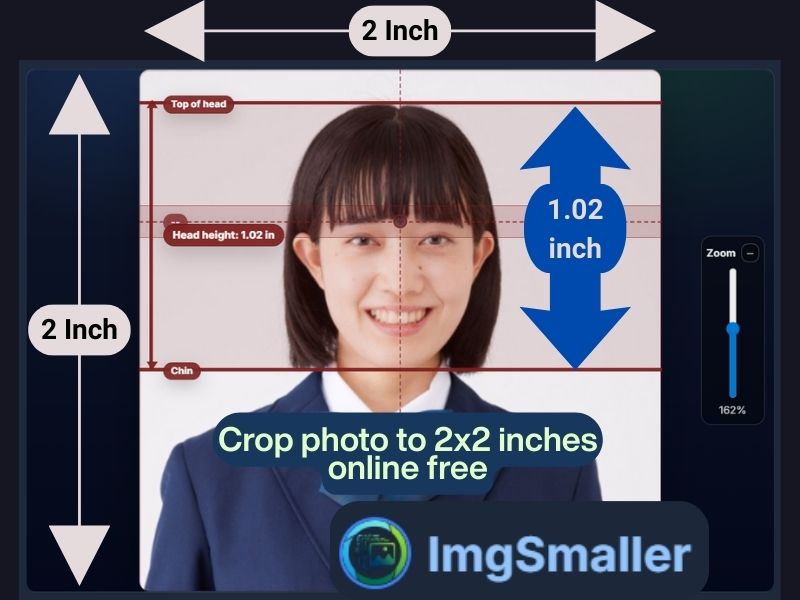
What Is a 2x2 Inch Photo?
A 2x2 inch photo means:
-
Width: 2 inches
-
Height: 2 inches
-
Aspect Ratio: 1:1 (Square)
This photo size is one of the most commonly required formats worldwide, especially for official documentation.
2x2 Inch Photo Size in Pixels
| DPI | Pixel Size |
|---|---|
| 300 DPI (Recommended) | 600 × 600 pixels |
| 200 DPI | 400 × 400 pixels |
| 72 DPI (Web) | 144 × 144 pixels |
Most authorities and printing standards prefer 300 DPI, which ensures clarity and professional quality. ImgSmaller automatically maintains correct proportions when you crop photo to 2x2 inches online free.
Why Exact 2x2 Inch Cropping Is Critical
Many applications use automated photo validation systems. Even a minor mismatch can lead to rejection.
Common Rejection Reasons
❌ Incorrect dimensions
❌ Wrong aspect ratio
❌ Face not centered
❌ Image stretched or compressed
❌ Low resolution or blur
ImgSmaller is built for users who need precision, speed, and privacy. Unlike generic image editors, ImgSmaller focuses on real-world document requirements, including exact inch-based cropping.
Key Features of ImgSmaller
✔ Crop photo to 2x2 inches online free
✔ No watermark
✔ No signup or login
✔ Exact inch-to-pixel conversion
✔ Supports JPG, PNG, WebP
✔ Mobile & desktop friendly
✔ Zero-Upload (Browser-Based) Mode
✔ High-quality output
How to Crop Photo to 2x2 Inches Online Free (Step-by-Step)
Step 1: Open ImgSmaller Crop Tool
Access the crop or resize tool on ImgSmaller.
Step 2: Upload Your Photo or Use Zero-Upload Mode
-
Select an image from your device
-
Or enable browser-based processing, where the image never leaves your device
Step 3: Choose 2x2 Inches
-
Set width: 2 inches
-
Set height: 2 inches
-
DPI: 300 (recommended)
Step 4: Adjust the Crop Area
-
Center your face properly
-
Ensure head and shoulders are visible
-
Avoid cutting off hair, ears, or chin
Step 5: Download Instantly
Your perfectly cropped 2x2 inch photo is ready to use.
Zero-Upload Mode – 100% Privacy Guaranteed
One of the strongest reasons users trust ImgSmaller is its Zero-Upload Mode.
What Is Zero-Upload (Browser-Based) Cropping?
-
All processing happens inside your browser
-
No image is uploaded to any server
-
No data is stored or logged
-
Ideal for sensitive photos like passports and IDs
This makes ImgSmaller one of the most privacy-friendly online photo tools available.
Use Cases: Crop Photo to 2x2 Inches Online Free
1. Passport Photos
Many passport formats require:
-
2x2 inches
-
Square aspect ratio
-
Clear face and white background
ImgSmaller ensures correct size without distortion.
2. Visa Applications
Visa portals often reject photos due to:
-
Incorrect dimensions
-
File size issues
With ImgSmaller, you can crop to 2x2 inches and compress the file if required.
3. Government Exams & Job Applications
Online forms have strict photo rules. ImgSmaller helps you meet:
-
Exact dimensions
-
File size limits
-
Clarity requirements
4. College & University Admissions
Educational institutions frequently require 2x2 inch photos for:
-
Admission forms
-
ID cards
-
Online verification
5. ID Cards & Official Records
2x2 inch photos are commonly used for:
-
Employee IDs
-
Membership cards
-
Certificates
Crop Photo to 2x2 Inches on Mobile (Android & iPhone)
ImgSmaller works smoothly on:
-
Android phones
-
iPhones
-
Tablets
You only need a modern browser—no app installation required.
Supported Image Formats
ImgSmaller supports:
-
JPG / JPEG
-
PNG
-
WebP
Some formats like AVIF or HEIC may depend on browser support, but most users have no issues with standard formats.
Image Quality: No Blur, No Stretching
When you crop photo to 2x2 inches online free, ImgSmaller:
-
Maintains original clarity
-
Preserves sharpness
-
Avoids pixel stretching
-
Ensures professional output
Using a dedicated tool like ImgSmaller eliminates these problems by ensuring pixel-perfect accuracy.
ImgSmaller vs Other Online Crop Tools
| Feature | ImgSmaller | Other Free Tools |
|---|---|---|
| Free without watermark | ✅ | ❌ |
| Exact 2x2 inches | ✅ | ❌ |
| Zero-upload privacy | ✅ | ❌ |
| No signup | ✅ | ❌ |
| High quality output | ✅ | ⚠️ |
| Mobile friendly | ✅ | ⚠️ |
SEO-Focused Advantage of ImgSmaller
The keyword “crop photo to 2x2 inches online free” reflects clear user intent:
-
Fast solution
-
No cost
-
No software
-
Accurate size
ImgSmaller satisfies all these needs, making it an ideal landing page tool for both search engines and users.
Best Practices for Perfect 2x2 Inch Photos
✔ Use a high-resolution original photo
✔ Stand against a plain white wall
✔ Avoid shadows and glare
✔ Maintain neutral expression
✔ Crop carefully before final download
ImgSmaller makes these steps easy, even for beginners.
Why ImgSmaller Is the Best Tool in 2026
In 2026, users expect tools that are:
-
Privacy-first
-
Fast
-
Accurate
-
Free
-
Easy to use
ImgSmaller delivers all of this with a strong focus on exact size-based photo editing, especially for 2x2 inch cropping.
