
Resize Image for WhatsApp DP Without Cropping

Drag & drop images here
or
Accepted: JPG, PNG, WEBP, HEIC/HEIF
Preset sizes by Country Advanced settings
Custom Converts cm/mm/in → pixels using DPI
Choose the unit for width & height
(pixels auto-calculated)
Apply width & height
Max 2 MB

Resize Image for WhatsApp DP Without Cropping in HD Quality
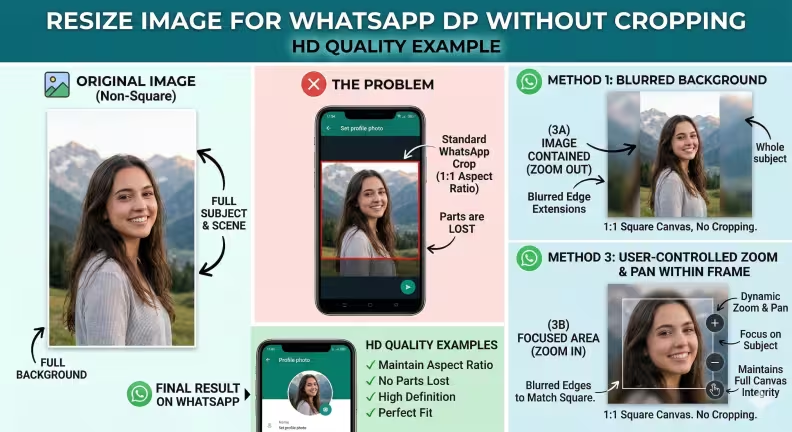
 

An infographic titled "Resize Image for WhatsApp DP Without Cropping: HD Quality Example." It compares the standard WhatsApp cropping problem, which forces a 1:1 square and cuts off parts of a rectangular photo, with solutions that preserve the whole image. The graphic demonstrates adding blurred background extensions to fit the full photo into a square canvas. It also highlights a user-controlled zoom and pan feature, showing how to zoom out to fit the entire image or zoom in to focus on the subject, all while maintaining the integrity of the square frame and HD quality.


Want to upload a full photo as your WhatsApp profile picture but it keeps getting cropped or losing quality? Our Resize Image for WhatsApp DP Without Cropping in HD Quality tool helps you adjust your photo perfectly so it fits the WhatsApp profile frame without cutting any part of the image. You can also zoom in, zoom out, and reposition the image to get the perfect framing before downloading it in HD quality.

With this tool, your photo stays sharp, clear, and perfectly centered, making it ideal for your WhatsApp display picture.


What Is “Resize Image for WhatsApp DP Without Cropping”?

When you upload a profile picture on WhatsApp, the app automatically crops images into a square format. This can cut off important parts of your photo such as your face edges, shoulders, or background.

Our Resize Image for WhatsApp DP Without Cropping in HD Quality tool solves this problem by adjusting the canvas and fitting your image into the correct square format while keeping the entire photo visible.


Zoom In or Zoom Out for Perfect Framing

Sometimes your photo needs slight adjustments to look perfect as a profile picture. With this tool you can:

  • Zoom in to focus more on your face

  • Zoom out to include more of the background

  • Move the image position to center it perfectly

  • Adjust the photo until it looks ideal inside the WhatsApp DP frame

These controls help you create a balanced and professional-looking profile picture.


Remove Background for a Cleaner Profile Picture

Our tool also allows you to remove the background from your image automatically. This helps create a clean and professional WhatsApp DP.

You can:

  • Remove unwanted backgrounds

  • Highlight the subject of the photo

  • Replace the background with white or another color

  • Create a clean portrait-style profile image


Key Features

Our WhatsApp DP image resizer includes powerful yet simple editing options:

  • Resize image for WhatsApp DP without cropping

  • Maintain HD image quality after resizing

  • Zoom in or zoom out for better framing

  • Move and reposition the image easily

  • Remove background automatically

  • Keep the full image visible in the profile frame

  • Supports JPG, PNG, and WebP images

  • Free and easy to use online


How to Resize Image for WhatsApp DP Without Cropping

Follow these easy steps to prepare your WhatsApp profile picture:

  1. Upload the image you want to use as your WhatsApp DP.

  2. Zoom in or zoom out to adjust the image framing.

  3. Move the image to position it perfectly inside the frame.

  4. Optionally remove the background for a cleaner look.

  5. Download the HD-quality resized image ready for WhatsApp.

Within seconds, your image will be optimized for a perfect WhatsApp display picture without cropping.


Best HD Size for WhatsApp Profile Picture

The ideal HD size for a WhatsApp profile photo is:

1080 × 1080 pixels

This resolution keeps your image clear and sharp on modern smartphones while fitting perfectly into the square profile frame.


Free Online WhatsApp DP Image Resizer

You don’t need to install any apps or editing software. Our Resize Image for WhatsApp DP Without Cropping in HD Quality tool works completely online.

Upload your image, adjust the zoom, remove the background if needed, and download your perfect WhatsApp profile picture in HD quality without cropping.

Frequently Asked Questions

How can I resize an image for WhatsApp DP without cropping?

You can use our Resize Image for WhatsApp DP Without Cropping tool to automatically fit your photo into the correct square format. The tool adds spacing around the image so the entire photo remains visible when uploading to WhatsApp without cutting any part of the picture.

Why does WhatsApp crop my profile picture?

WhatsApp automatically converts profile pictures into a square format, which often causes parts of the image to be cropped. If your photo is vertical or horizontal, the app may remove edges or background areas when you upload it as your DP.

Does WhatsApp support zooming or adjusting profile pictures?

No. The WhatsApp app does not natively support proper zooming or full image adjustment when setting a profile picture. You cannot easily zoom out or reposition the image to keep the full photo visible. That’s why using an external tool like our WhatsApp DP resizer without cropping helps ensure the entire image fits correctly.

What is the best size for a WhatsApp profile picture?

The recommended WhatsApp DP size is 640 × 640 pixels. However, for better clarity and HD display on modern smartphones, a 1080 × 1080 pixel image is ideal.

Can I zoom in or zoom out my image before setting it as WhatsApp DP?

Yes. Our tool allows you to zoom in, zoom out, and reposition the image so you can adjust the framing exactly how you want before downloading your WhatsApp-ready profile picture.

Will resizing reduce the quality of my image?

No. The Resize Image for WhatsApp DP Without Cropping tool keeps the image in HD quality while resizing it. This helps ensure your WhatsApp profile picture remains sharp and clear.

Can I remove the background from my WhatsApp DP image?

Yes. You can also remove the background from your photo using our tool. This helps create a clean and professional-looking WhatsApp profile picture by highlighting the subject.

Is this WhatsApp DP image resizer free?

Yes. Our Resize Image for WhatsApp DP Without Cropping tool is completely free to use online. You can resize, zoom, adjust, remove background, and download your WhatsApp DP without installing any software.

用户评价

Guest

good

Talha

Good

Guest

Rahul

Kevin Brooks, Florida, USA

ImgSmaller is a simple and useful image compression tool with good quality results and an easy interface. It works well for quick optimizations, though I’d love to see more advanced features and format options in future updates.

Ryan Thompson, USA

ImgSmaller makes image compression fast, simple, and perfect for improving website speed without sacrificing quality.

Michael Anderson, California, USA

ImgSmaller is an excellent image compression tool that helps reduce image size without losing quality. It’s fast, easy to use, and perfect for optimizing JPG, PNG, and WebP images for better website speed and SEO performance. The clean interface and privacy-focused zero-upload feature make it a reliable choice for developers, bloggers, and designers.

Kumari sunidhi

It's is so useful, thank you so much❤😊 U can provide the facility of converting compressed image results into pdf format, that will be so helpful. chatgpt told me about this website

撰写评论

No Login Required

Support ImgSmaller

Found it useful? Add a link to help others discover privacy‑friendly image compression.

Link to Us

分享此工具

分享可以帮助其他人找到这个免费工具。