
PAN Card Photo Resizer

Drag & drop images here
or
Accepted: JPG, PNG, WEBP, HEIC/HEIF
Preset sizes by Country Advanced settings
Custom Converts cm/mm/in → pixels using DPI
Choose the unit for width & height
(pixels auto-calculated)
Apply width & height
Max 2 MB

Compression options are disabled on this page. It resizes (and optionally crops) images to the specified dimensions.

Instruction: How to Capture a Proper Photo on Your Phone or Camera Before Image Resize
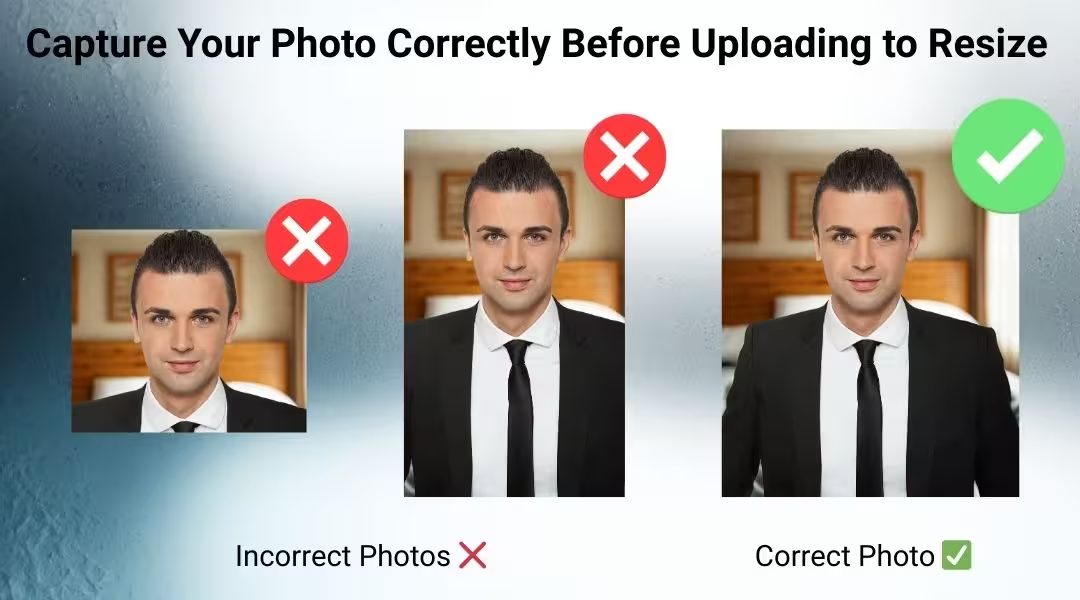
How to take a picture in your phone before resize an image


PAN Card Photo Resizer – Resize Photo to 3.5cm × 2.5cm Instantly (Free Online)

The PAN Card Photo Resizer is a free online tool that helps you resize your photo to the exact size required for Indian PAN card applications. Whether you are applying for a new PAN card or updating your details, this tool automatically adjusts your image to 3.5 cm × 2.5 cm (35mm × 25mm) with proper face alignment and background formatting.

No Photoshop. No manual cropping. No design skills required.


✅ Key Features

  • 📏 Exact PAN Card Size – Automatically resizes your photo to 35mm × 25mm.

  • 🤖 Smart Face Detection & Auto Crop – Detects your face and aligns it properly.

  • Background Adjustment – Ensures clean white/light background compliance.

  • 📐 Head Height Guidance – Maintains correct face proportion as per ID standards.

  • 🖼️ Pixel Conversion Ready – Export in required pixel dimensions (e.g., 413 × 295 px at 300 DPI).

  • 🔒 Secure & Private Processing – Your photos are not stored.

  • 📄 Printable Sheet Option – Generate multiple copies on a single A4 sheet.

  • 💾 Download in JPG format ready for upload or print.


📌 PAN Card Photo Requirements (India)

  • Size: 3.5 cm × 2.5 cm

  • Background: White or light-colored

  • Face: Clearly visible, centered

  • No shadows, no filters

  • Neutral expression

Our tool ensures your image meets these requirements automatically.


🚀 How to Use the PAN Card Photo Resizer

  1. Upload your photo.

  2. The system auto-detects and crops your face.

  3. Adjust position if needed.

  4. Download the resized PAN card photo instantly.

  5. Optionally generate a printable sheet with multiple copies.

Perfect for online PAN applications, NSDL/UTIITSL submissions, and printing at home or studio.

Frequently Asked Questions

What is the exact PAN card photo size?

The official PAN card photo size is 3.5 cm × 2.5 cm (35mm × 25mm). Your photo should have a clear white or light background with your face centered and clearly visible.

Can I use this pan card photo resizer for online PAN application?

Yes. Our pan card photo resizer creates photos in the correct dimensions required for online PAN applications through NSDL or UTIITSL. You can download the resized image and upload it directly.

What pixel size is required for PAN card photo?

At 300 DPI, the recommended pixel size is approximately 413 × 295 pixels (height × width). Our tool automatically adjusts the correct pixel dimensions for you.

Does the tool automatically crop and align the face?

Yes. The tool uses smart face detection to automatically crop and align your photo according to PAN card standards. You can also manually adjust if needed.

Is the background required to be white?

Yes. PAN card photos must have a white or light-colored background. Our tool can help ensure your background meets this requirement.

Is this PAN card photo resizer free to use?

Yes. It is completely free, with no registration required. You can resize and download your photo instantly.

Can I generate a printable sheet with multiple copies?

Yes. You can generate a printable sheet and select the number of copies you need. The sheet can be downloaded in JPG or PDF format for easy printing.

Is my uploaded photo stored on your server?

No. Your images are processed securely and are not stored permanently, ensuring privacy and data safety.

Lo que dicen los usuarios

Kevin Brooks, Florida, USA

ImgSmaller is a simple and useful image compression tool with good quality results and an easy interface. It works well for quick optimizations, though I’d love to see more advanced features and format options in future updates.

Ryan Thompson, USA

ImgSmaller makes image compression fast, simple, and perfect for improving website speed without sacrificing quality.

Michael Anderson, California, USA

ImgSmaller is an excellent image compression tool that helps reduce image size without losing quality. It’s fast, easy to use, and perfect for optimizing JPG, PNG, and WebP images for better website speed and SEO performance. The clean interface and privacy-focused zero-upload feature make it a reliable choice for developers, bloggers, and designers.

Kumari sunidhi

It's is so useful, thank you so much❤😊 U can provide the facility of converting compressed image results into pdf format, that will be so helpful. chatgpt told me about this website

Escribe una reseña

No Login Required

Support ImgSmaller

Found it useful? Add a link to help others discover privacy‑friendly image compression.

Link to Us

Comparte esta herramienta

Compartir ayuda a que otros encuentren esta herramienta gratuita.