
Indian Visa Photo Size Online Free – 2x2 Inch Visa Photo Maker

Drag & drop images here
or
Accepted: JPG, PNG, WEBP, HEIC/HEIF
Preset sizes by Country Advanced settings
Custom Converts cm/mm/in → pixels using DPI
Choose the unit for width & height
(pixels auto-calculated)
Apply width & height
Max 2 MB

Compression options are disabled on this page. It resizes (and optionally crops) images to the specified dimensions.

Powerful AI Features Included

Automatic face detection & smart crop

🌍

Country-wise passport photo sizes

🎨

White background adjustment

🖨️

High-resolution output (300 DPI ready)

📄

Printable photo sheet layout

🖼️

Supports JPG, PNG, WEBP

🤖

High-quality AI background removal

🔒

Secure processing & privacy-first system

🚫

No watermark

Indian Visa Photo Size Online Free – 2x2 Inch Visa Photo Maker by ImgSmaller
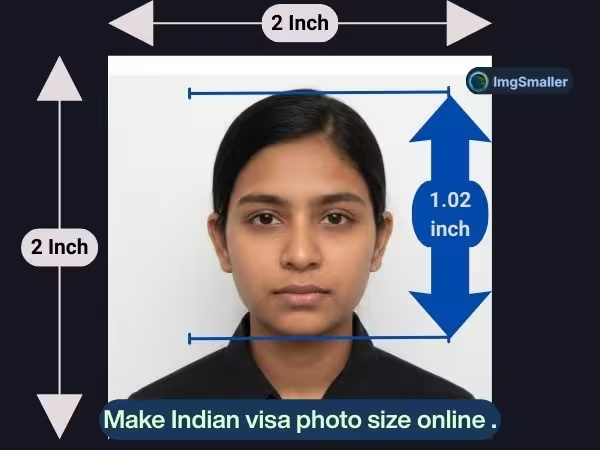
 

Indian visa photo 2x2 inch 51x51mm sample with white background ready for online upload

Need to create an Indian visa photo size online free? ImgSmaller helps you generate a perfectly formatted 2x2 inch (51mm x 51mm) Indian visa photo that meets official digital submission standards. No need to visit a studio. No manual cropping. Just upload your image and download a ready-to-submit JPEG file in seconds.

Our intelligent tool ensures your Indian visa photo size online free meets required dimensions, pixel resolution, file size limits, and biometric guidelines for smooth visa application processing.


The standard Indian visa photo size must meet the following requirements:

Specification Requirement
Photo Size (Inches) 2 x 2 inches
Photo Size (Millimeters) 51mm x 51mm
Resolution 300 DPI
Minimum Pixel Size 350 x 350 pixels
Maximum Pixel Size 1000 x 1000 pixels
File Format JPEG (.jpg)
File Size Range 10 KB – 1 MB (portal dependent)
Color Mode Color photo only
Background Solid white (#FFFFFF)

ImgSmaller automatically resizes and optimizes your photo to match these official specifications when generating your Indian visa photo size online free.


👤 Face & Composition Guidelines for Indian Visa Photo

For visa approval, biometric accuracy is essential. Your photo must follow these facial positioning rules:

Requirement Details
Face Position Full face, front view
Expression Neutral (no smile, mouth closed)
Eyes Open and clearly visible
Head Alignment Centered, not tilted
Face Coverage 70%–80% of photo area
Shadows No shadows on face or background
Recency Recent photo reflecting current appearance

Our smart face detection ensures correct head positioning and accurate cropping for the ideal Indian visa photo size online free.


🔍 Pixel Conversion Guide (At 300 DPI)

For better technical clarity, here’s how 2x2 inches translates into pixels at 300 DPI:

Inches DPI Pixel Dimensions
2 x 2 inch 300 DPI 600 x 600 pixels

While the portal may allow 350–1000 pixels, 600 x 600 pixels at 300 DPI is considered the ideal standard output.


🛠 How to Create Indian Visa Photo Size Online Free

  1. Upload your photo

  2. Let AI auto-detect and crop your face

  3. Generate 2x2 inch (51mm x 51mm) visa photo

  4. Download optimized JPEG file

Your photo will be ready in less than 60 seconds.


⚠ Common Mistakes to Avoid

When creating your Indian visa photo size online free, avoid:

  • Colored or patterned backgrounds

  • Blurry or low-resolution images

  • Overexposed or dark lighting

  • Excessive editing or filters

  • Incorrect aspect ratio (not square 1:1)

ImgSmaller prevents these common issues by enforcing correct size, format, and alignment.


🎯 Perfect For:

  • Tourist Visa Applications

  • Student Visa Applications

  • Work & Employment Visa

  • Business Visa

  • Immigration & PR Applications

If you need a fast, accurate, and compliant solution for Indian visa photo size online free, ImgSmaller provides a reliable and easy-to-use online tool that meets official technical standards.

Frequently Asked Questions

What is the correct Indian visa photo size?

The correct Indian visa photo size is 2 x 2 inches (51mm x 51mm). The photo must be square, in color, and taken against a plain white background.

What should be the pixel size for Indian visa photo?

For Indian visa photo size online free, the accepted pixel range is: Minimum: 350 x 350 pixels, Maximum: 1000 x 1000 pixels, Recommended: 600 x 600 pixels at 300 DPI. This ensures proper clarity and biometric compliance.

What is the required resolution (DPI) for Indian visa photo?

The required resolution is 300 DPI. This ensures your visa photo is sharp and suitable for both online submission and printing.

What file format is required for Indian visa photo?

The photo must be uploaded in JPEG (.jpg) format. Other formats like PNG or PDF are usually not accepted by visa portals.

What should be the file size for Indian visa photo?

The typical file size requirement ranges between 10 KB and 1 MB, depending on the visa application portal. The image must not exceed the maximum upload limit specified.

What background is required for Indian visa photo?

The background must be solid white (#FFFFFF) with: No shadows, No patterns, No textures, No objects visible.

How much of the face should be visible in the Indian visa photo?

Your face should cover 70% to 80% of the photo area, with: Full front-facing view, Eyes open and visible, Neutral expression, Head centered.

Can I take Indian visa photo at home?

Yes. You can create your Indian visa photo size online free using ImgSmaller. Simply take a clear photo against a white background, upload it, and let the tool auto-crop and resize it to 2x2 inches.

Can I use a mobile phone to create Indian visa photo size online free?

Yes. ImgSmaller works perfectly on mobile devices. You can upload a smartphone photo and instantly convert it into the correct 2x2 inch Indian visa photo format.

How long does it take to create Indian visa photo size online free?

It takes less than one minute. Upload your photo, let the AI auto-adjust face alignment, and download the ready-to-submit JPEG file.

Ce que disent les utilisateurs

Kevin Brooks, Florida, USA

ImgSmaller is a simple and useful image compression tool with good quality results and an easy interface. It works well for quick optimizations, though I’d love to see more advanced features and format options in future updates.

Ryan Thompson, USA

ImgSmaller makes image compression fast, simple, and perfect for improving website speed without sacrificing quality.

Michael Anderson, California, USA

ImgSmaller is an excellent image compression tool that helps reduce image size without losing quality. It’s fast, easy to use, and perfect for optimizing JPG, PNG, and WebP images for better website speed and SEO performance. The clean interface and privacy-focused zero-upload feature make it a reliable choice for developers, bloggers, and designers.

Kumari sunidhi

It's is so useful, thank you so much❤😊 U can provide the facility of converting compressed image results into pdf format, that will be so helpful. chatgpt told me about this website

Écrire un avis

No Login Required

Support ImgSmaller

Found it useful? Add a link to help others discover privacy‑friendly image compression.

Link to Us

Partagez cet outil

Le partage aide les autres à trouver cet outil gratuit.