
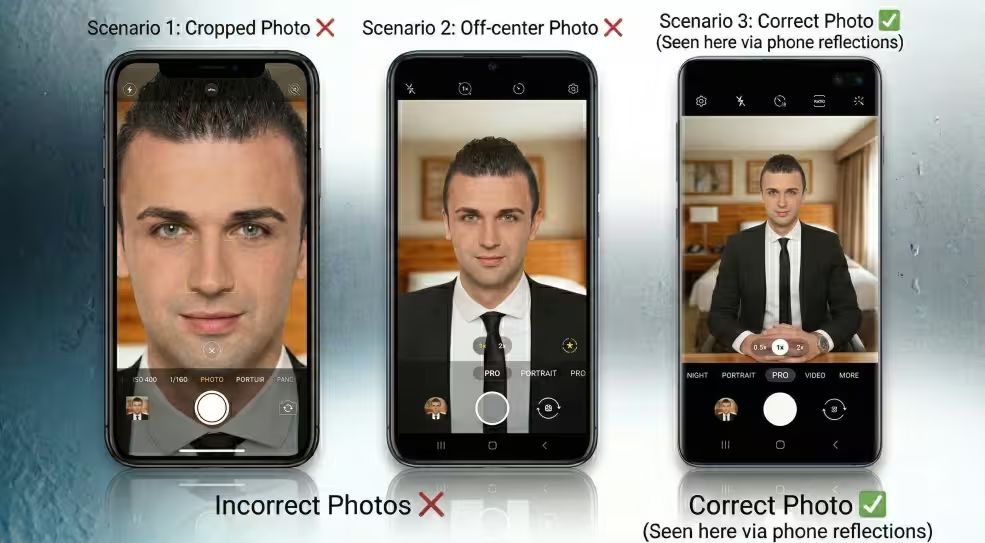
Instruction: How to Capture a Proper Photo on Your Phone or Camera Before Image Resize
Powerful AI Features Included
Automatic face detection & smart crop
Country-wise passport photo sizes
White background adjustment
High-resolution output (300 DPI ready)
Printable photo sheet layout
Supports JPG, PNG, WEBP
High-quality AI background removal
Secure processing & privacy-first system
No watermark
Edit Photo to Passport Size Online (Free Passport Photo Maker)
Need to edit photo to passport size quickly and accurately? With ImgSmaller, you can convert any photo into a perfect passport-size image in seconds. Our online tool allows you to resize, crop, adjust face height, remove background, and apply country-specific passport photo presets automatically.
Whether you are applying for a passport, visa, government form, job application, or ID card, ImgSmaller helps you create a compliant passport photo without using complicated photo editing software.
Simply upload your photo, select your country, and download your passport-size photo instantly.
Powerful Passport Photo Editor with Smart AI Features
ImgSmaller provides an advanced yet simple passport size photo editor online designed for accuracy and convenience.
Key Features
✔ Edit photo to passport size instantly
✔ Auto face height adjustment to meet passport standards
✔ AI background removal and white background replacement
✔ Country-wise passport presets (automatically sets correct size)
✔ Automatic cropping and alignment
✔ High-quality image output
✔ Works on mobile, tablet, and desktop
✔ 100% free online tool
Our smart editor ensures your photo meets official passport photo requirements in just a few clicks.
Auto Face Height Adjustment (Passport Compliance)
One of the most common reasons passport photos get rejected is incorrect face size or head positioning.
ImgSmaller automatically detects your face and adjusts the head height and position according to passport standards.
The system ensures:
-
Proper head size ratio
-
Correct eye level alignment
-
Centered face positioning
-
Accurate spacing above the head
This automatic face height adjustment ensures your passport photo follows official guidelines used by government authorities.
AI Background Removal for Passport Photos
Passport photos require a plain white or light background. Many users take photos in normal environments where the background is not suitable.
ImgSmaller includes an AI-powered background remover that:
-
Detects the subject automatically
-
Removes complex backgrounds
-
Replaces them with a clean white background
-
Maintains natural edges and hair details
This allows you to create professional passport photos at home without visiting a photo studio.
Country-Wise Passport Photo Presets
Different countries require different passport photo dimensions. ImgSmaller includes country-specific presets that automatically apply the correct size and formatting.
| Country | Passport Photo Size |
|---|---|
| United States | 2 × 2 inches |
| India | 2 × 2 inches |
| United Kingdom | 35 × 45 mm |
| Canada | 50 × 70 mm |
| Australia | 35 × 45 mm |
| Schengen Visa | 35 × 45 mm |
Simply choose your country, and the tool automatically applies the correct dimensions, face ratio, and margins.
How to Edit Photo to Passport Size
Follow these simple steps to create your passport photo.
Step 1 – Upload Your Photo
Select a photo from your device.
Step 2 – Choose Your Country
Select your country to apply the correct passport photo size.
Step 3 – Auto Adjust Face Height
Our tool automatically adjusts face size and alignment.
Step 4 – Remove Background
Use AI background removal to get a clean white background.
Step 5 – Download Passport Photo
Download your passport-size image ready for printing or submission.
Why Use ImgSmaller Passport Photo Maker
ImgSmaller is designed to make passport photo editing simple, fast, and accurate.
No Photo Editing Skills Required
The tool automatically handles resizing, cropping, and positioning.
Accurate Passport Photo Standards
Face height and image size follow official passport guidelines.
Fast Processing
Create a passport photo in seconds.
Secure Image Processing
Your images are processed safely and are not stored permanently.
Whether you need to edit photo to passport size for passport applications, visa forms, ID cards, or online submissions, ImgSmaller provides the easiest solution.
Tips for a Perfect Passport Photo
For best results, follow these guidelines:
-
Use good lighting
-
Avoid shadows on the face
-
Look directly at the camera
-
Maintain a neutral expression
-
Keep hair away from the face
-
Use a plain background if possible
Even if your background is not ideal, ImgSmaller can remove the background automatically.
